Node Program Installation
Introduction
Info
This guide assumes you have already followed the Server Setup Guide and are comfortable managing a Linux server.
This guide walks you through installing, registering, and preparing a delegate node. By the end of the guide, your node will be ready to participate in securing the X-Cash public network (once elected as a delegate 😉).
The xcash-dpops program manages block validation, delegate communication, block production, and voter reward distribution.
Requirements
Dependencies
Info
Dependencies are automatically installed and maintained by the installer script.
Auto Installer
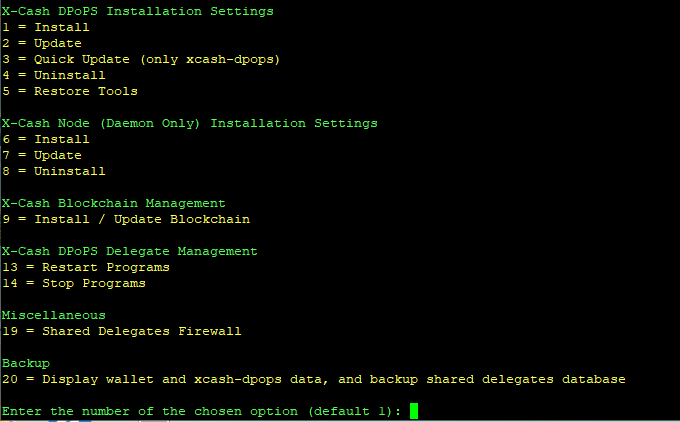
The installer script is designed to interact with the xcash-dpops program and provide guided steps for installation, updates, and service management. It can also be used to restart services if you are not comfortable managing them manually from the command line.
Once your Linux instance is prepared (see the Server Setup Guide), run the installer script to install, build, and configure the delegate node. The installer will also download and synchronize the blockchain.
To start the installation process, run the latest version of the installer script:
bash -c "$(curl -fsSL https://raw.githubusercontent.com/Xcash-Labs/xcash-labs-dpops/master/scripts/autoinstaller/autoinstaller.sh)"
Info
You can opt to run the installer inside a terminal multiplexer such as byobu or tmux if you get interruptions caused by SSH disconnects.
Choose Install from the installer menu to begin.
1. Installation Directories
Directories are selected automically.
2. Delegate Mode
When setting up the delegate only Shared mode is allow by default, but this can be change later using the installer menu
Types of Delegates
Shared Delegate
- Rewards automatically distributed to voters
- Suitable for community-operated delegates
- Requires prefunding the delegate wallet
Info
Shared delegates should pre-fund their wallet to ensure early reward payouts. It is recommended to keep approximately 500k–1M XCASH in the delegate wallet before rewards begin.
Solo Delegate
- Self-voted delegate
- If no XCA voting addresses are configured, all rewards are paid to the delegate wallet
- Manual reward distribution is required when no voting addresses are configured
- You can optionally restrict voting by specifying which XCA wallet addresses are allowed to vote for this delegate
- when the system is fully operational a sole node with no voters will probably not make it into the top 50 delegates
Info
The minimum payment amount will default to 1000 and and the delegate fee will default to 5%. Both of these amounts can be changed later.
3. Block Reward Wallet
You must configure a wallet to receive block rewards.
Options:
- Create a new wallet
- Restore an existing wallet from mnemonic seed
If creating a new wallet, you may:
- Automatically generate a password
- Provide a custom password
If restoring, you will be prompted for the mnemonic seed and a new password.
4. Block Verifier Keys
Each delegate is identified by a block verifier key.
Options:
- Create a new key pair
- Import an existing private key
Danger
Securely back up your block verifier keys. Loss will permanently prevent delegate operation and may result in loss of funds.
5. Finishing Installation
An installation summary will be displayed before execution.
Warning
Wallet passwords are shown once more at the end. Store them securely.
The installer will:
- Build and install dependencies
- Download the blockchain
- Create and synchronize the delegate wallet
Info
Initial synchronization may take a while depending on system performance and network speed.
Once complete, your delegate wallet details will be displayed.
Danger
Back up all wallet and verifier information immediately. Loss is irreversible.
By default, the wallet is stored in:
Info
By default, the wallet is named delegate-wallet and is stored in ~/xcash-labs/xcash-wallets/